





CoralPlast frequently asked questions
Quick answers about installation, compatibility, Wi-Fi, roller filters, sensors, CP-FLOW, CP-SWEEP and troubleshooting.
Current product guides are available in French while the other language versions are being prepared.
Automatic roller filters
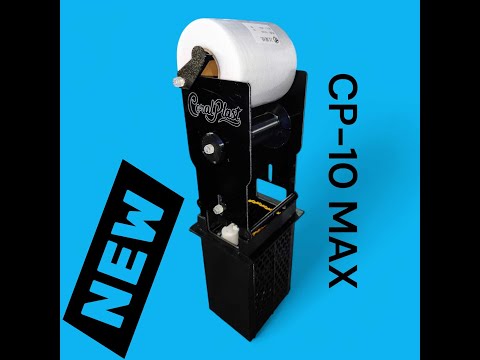
CP-4, CP-4 SLIM, CP-WB, CP-RS, CP-OFF, CP-10 MAX, CP-15, CP-20 and variants
How does an automatic roller filter work?
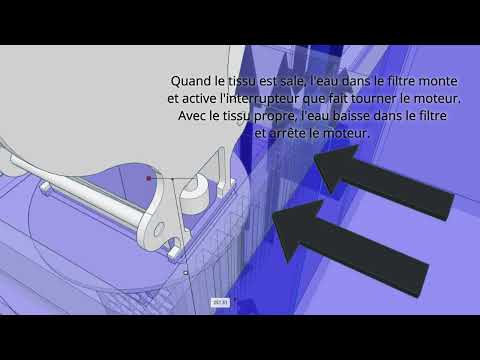
Water passes through a filter fleece. As waste loads the fleece, the water level rises. The sensor detects the rise, the motor advances the fleece, and a clean section replaces the saturated area.
The cycle repeats automatically, reducing manual maintenance compared with filter socks.
How do I change the filter roll?
Switch off the power, remove the used fleece and install the new roll following the original path. Keep the fleece centred, without major folds, and correctly engaged on the take-up shaft.
After replacement, run a manual test to confirm that the roll advances correctly.
Which replacement rolls should I use?
The replacement roll must match the width of your model. Fleece width varies by filter. CoralPlast offers pre-cut rolls for the different models.
Is the filter compatible with my aquarium?
Compatibility mainly depends on available space, the existing holder, water height, actual flow and whether the sensor can be installed correctly.
- CP-RS: designed for certain Red Sea MAX NANO systems.
- CP-WB: designed for certain Waterbox AIO installations.
- CP-4 / CP-4 SLIM: compact option for 4-inch filter-sock holders.
- CP-OFF: alternative for installations without a conventional filter-sock holder.
- CP-10 MAX, CP-15, CP-20: for higher flow or more available space.
For a reliable check, send a photo of your sump or technical compartment.
Which filter should I choose for my aquarium?
Tank volume is only a first indication. The main criteria are the actual flow through the filter and the space available.
| Model | Main use | Practical actual-flow reference |
|---|---|---|
| CP-RS / CP-WB | Specific compatible tanks | Moderate flow |
| CP-4 / CP-4 SLIM / CP-OFF | Compact installations | Up to approx. 3,000 L/h |
| CP-10 MAX | Medium sumps | Up to approx. 4,300 L/h |
| CP-15 | Higher flow | Up to approx. 6,500 L/h |
| CP-20 | Large systems | Up to approx. 8,800 L/h |
These are practical reference values. Actual flow always depends on the pump, head height and plumbing.
Why is actual flow different from the pump rating?
Pump flow is usually measured under ideal conditions. In a real installation it decreases because of head height, elbows, valves, pipe length and pressure losses.
Choose a filter from estimated actual flow, not only the maximum figure printed on the pump.
What micron rating is the filter fleece?
Roller-filter fleece is a non-woven material, not a regular nylon mesh. Clean fleece initially passes water more easily; as it loads, filtration gradually becomes finer while flow falls. A single fixed micron figure is therefore not very representative.
How often should I replace the roll?
It depends on tank load, fish stock, feeding, flow and sediment. Depending on the installation, one roll can last from a few weeks to several months.
The filter advances too often: what should I check?
- Sensor height: if it is too low, it triggers too early.
- Water level: small waves and variations can trigger the float.
- Fleece alignment: poor alignment can restrict water flow.
- Flow: a filter operating near its limit may advance more often.
The water level rises but the filter does not advance: what should I do?
- Check the power supply.
- Check that the float moves freely.
- Check that the fleece is not jammed or overly tight.
- Check that the take-up shaft turns freely.
- Run a manual motor test if your controller supports it.
Controllers & Wi-Fi
CP-Controller, CP-Control PLUS, local interface, AP Wi-Fi and setup
What is the difference between CP-Controller and CP-Control PLUS?
Depending on the version, some controllers use a Tuya / Smart Life type app, while others use a local web interface accessed directly over Wi-Fi.
- CP-Controller: app control depending on version.
- CP-Control PLUS: local AP-mode interface, with no mandatory app.
If you are unsure which version you have, send a photo of the controller or product label.
My Wi-Fi device does not appear: what should I check?
- Use a 2.4 GHz Wi-Fi network if the device must join your router.
- Keep the phone close to the controller during setup.
- Temporarily disable mobile data if the phone leaves the device Wi-Fi.
- Restart the controller and repeat setup.
- Check the Wi-Fi password.
Can the device work without Internet?
Yes. Devices with a local AP-mode interface can work without Internet by connecting directly to the device Wi-Fi.
For cloud-app products, Internet may be required for notifications or remote control.
How do I manually test filter advance?
Gently lift the float to simulate a rising water level. The motor should advance the fleece briefly. Some versions also provide a manual button in the interface.
Is my float sensor compatible with my version?
Some sensors or cables are compatible only with a specific controller version. Connector type and product version matter. If in doubt, send a photo of the connector before ordering a replacement part.
Alarms, sensors & safety
Level sensors, overflow protection, reservoirs, skimmers and installation safety
What is a level or overflow alarm for?
A level alarm can warn you when a reservoir is too full, too empty, or when an abnormal level is detected. It can be used on an RO reservoir, sump, skimmer, mixing vessel or filling system.
What is a non-contact sensor for?
A non-contact sensor can detect water through a non-metallic plastic or glass wall. It avoids immersing the sensor directly and helps limit salt, corrosion and deposit issues.
What can an overflow-protection system be used for?
- Shut off a solenoid valve while filling a reservoir.
- Stop a pump if the level becomes abnormal.
- Prevent a skimmer cup from overflowing.
- Receive a high- or low-level alert.
- Add a secondary safety layer to an ATO system.
I get false alerts: how can I make the sensor more reliable?
- Mount the sensor firmly with no play or vibration.
- Keep it away from bubbles, turbulence and splashes.
- Clean the detection area regularly.
- Avoid areas where the level changes rapidly.
- Test several positions before final installation.
Can a pump or solenoid valve be switched off automatically?
Yes. Depending on the system, the sensor can be paired with a smart plug or controller so that connected equipment is switched off if an abnormal level is detected.
For critical equipment, use a safety-oriented setup and test the scenario before relying on it.
Smart plugs & automations
Control, power monitoring, safety shutdown and automated scenarios
What is a smart plug with power monitoring for?
It can remotely control equipment, run schedules, monitor power use and create automations with compatible sensors.
Which devices can be controlled with a smart plug?
- RO or filling solenoid valve.
- ATO pump depending on the scenario.
- Skimmer as overflow protection.
- Fan, lighting, UV or small auxiliary equipment.
Be very careful with a main return pump and avoid automations that could shut down the aquarium by mistake.
Is 2.4 GHz Wi-Fi required?
Most smart plugs and home-automation modules use 2.4 GHz Wi-Fi. If your router combines 2.4 and 5 GHz under one SSID, temporarily creating a separate 2.4 GHz network can help during setup.
Balling, reservoirs & mixing
Dosing reservoirs, mounts, CP-Stirrer WiFi, CP-MIX and solution preparation
What are Balling reservoirs for?
They store dosing solutions cleanly: KH, Ca, Mg, trace elements, phytoplankton or other compatible additives. Depending on the model, they can be wall-mounted, freestanding or placed next to a dosing pump.
Why use a magnetic stirrer?
Some solutions need to remain homogeneous. A magnetic stirrer can periodically resuspend the solution and reduce deposits at the bottom of the container.
The stir bar loses coupling: what should I do?
- Reduce the rotation speed.
- Check that the bar is centred.
- Use a bar suited to the container and liquid density.
- Clean the bottom if deposits interfere with rotation.
- Use gentler cycles for thicker solutions.
CP-FLOW & RO water
Production monitoring, RO system, counters, flow and fill safety
What is CP-FLOW for?
CP-FLOW monitors RO-water production, measures flow and totals produced volume. It helps you monitor real RO-system use and consumables.
How can I prevent overflow while producing RO water?
- Use an independent level sensor or alarm.
- Add a compatible solenoid valve or smart plug.
- Provide a higher secondary safety sensor.
- Always test the system before leaving it unattended.
Can the displayed flow change?
Yes. RO-system flow varies with pressure, temperature, cartridge condition, membrane, restrictors and incoming-water quality.
CP-SWEEP, flow & movement
Wi-Fi oscillators, angle settings, WaveBox and water movement
How is CP-SWEEP controlled?
CP-SWEEP uses a local web interface. Connect to the device Wi-Fi, then set angle, centre and movement behaviour from a phone or computer browser. No app is required on versions with the local interface.
What should I do if I lose connection during setup?
Stay connected to the device Wi-Fi. Some phones automatically leave a network without Internet and switch back to mobile data or the home router. Temporarily disable mobile data or manually reconnect to the CP-SWEEP Wi-Fi.
Which WaveBox size should I choose?
- NANO: smaller systems.
- MID: medium systems.
- GIGA: larger installations.
The choice depends on tank volume and length, aquascape, pump and the type of movement you want.
Is one magnet enough to hold a WaveBox?
Depending on the installation, glass thickness, pump power and WaveBox position, one magnetic mount may not be enough. A second saltwater-compatible magnet may be required for safer mounting.
Spare parts & quick troubleshooting
Sensors, controllers, cables, motors, consumables, compatibility and checks
Which spare parts are available?
Depending on the product range, spare parts can include sensors, controllers, cables, extensions, motors, drive parts, mounts, replacement rolls and product-specific accessories. Check the product version and connector before ordering.
I am not sure which product version I have: what should I do?
Send a photo of the product, connector and relevant part. This helps avoid ordering an incompatible replacement.
What should I include in a troubleshooting request?
- Exact product model.
- A photo of the installation.
- A photo of the connector if the issue involves a sensor or controller.
- A short description of the problem.
- A video if the issue involves movement or noise.



Ask for advice
For a reliable compatibility check or faster troubleshooting, include the exact model and a photo of the installation.